Local LLMs · TUI · CLI · llama.cpp · Rust
Fast local LLMs with zero overhead.
Manage local LLMs from a beautiful terminal UI, without the setup drag.
curl -fsSL https://llamastash.dev/install.sh | sh brew install llamastash/llamastash/llamastash yay -S llamastash irm https://llamastash.dev/install.ps1 | iex scoop bucket add llamastash https://github.com/llamastash/scoop-llamastash; scoop install llamastash cargo install llamastash llamastash init 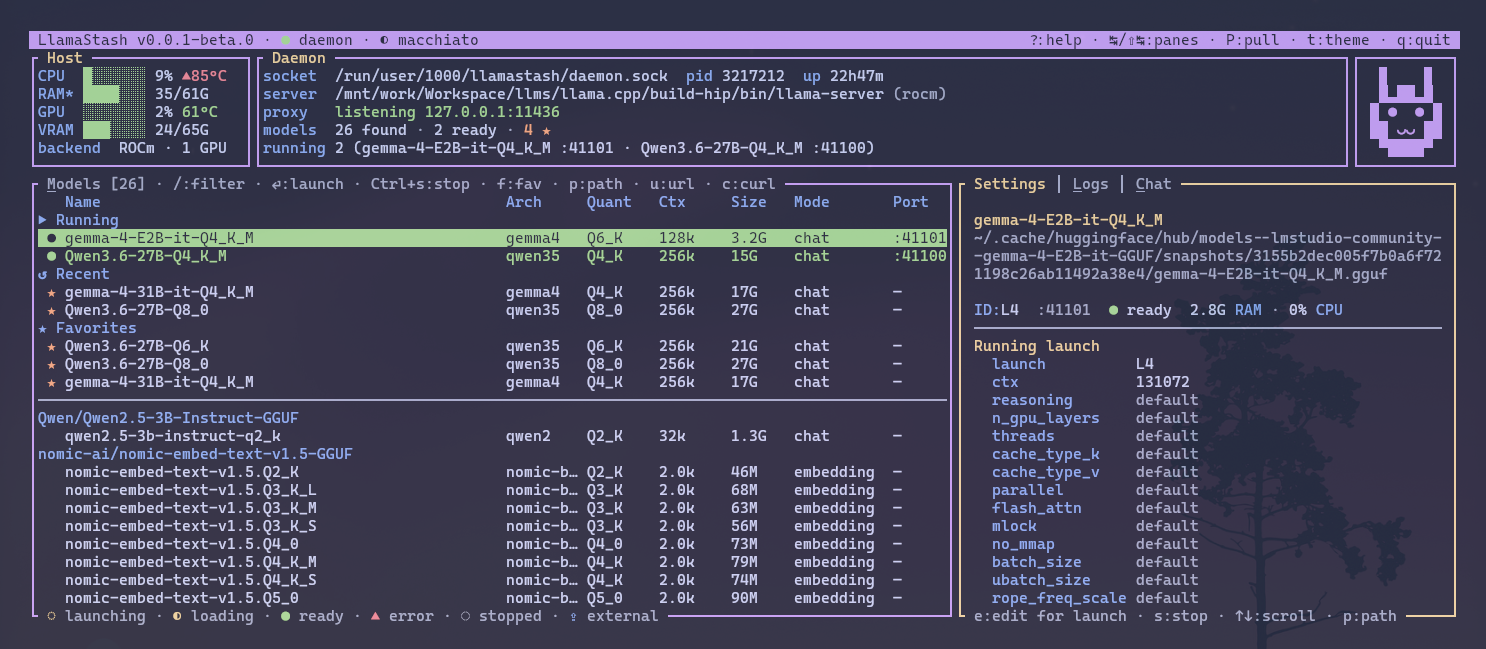
Features
The whole local-model loop, not just a launcher.
Install, discover, launch, smoke-test, script, and proxy local models through one tool. It stays transparent about llama.cpp while still smoothing off the annoying parts.
-
✓
Zero-to-chat init wizard
Run
llamastash initonce and it handles the annoying first-run work: detect hardware, install the right llama-server build, download a starter GGUF, write config, and smoke-launch it. -
✓
Scans what you already have
Walks HuggingFace, Ollama, and LM Studio caches plus user paths. Reads GGUF metadata, dedupes symlinks and split files, and watches the catalog for new models without a restart.
-
✓
One binary, three roles
The TUI, CLI, and daemon are the same binary. The daemon auto-spawns when needed, and running models survive UI exit. The CLI is built for agents too: stable
--jsonoutput, documented exit codes, and an installable AgentSkills bundle for Claude Code, OpenCode, and other harnesses. -
✓
Multiple inference backends
llama.cpp is the direct, zero-overhead default for GGUF. Four more backends plug into the same seam: the generic backend for any other OpenAI-compatible server you declare in config, like antirez's ds4 for DeepSeek-V4, gufo or Halogen, plus experimental vLLM and SGLang for the safetensors HuggingFace repos already in your cache, and Lemonade for NPU and ONNX inference on AMD Ryzen AI. The engine backends auto-detect when installed and stay out of the way when they aren't.
-
✓
Hardware-aware launches
Built-in arch defaults, per-model ports, health-probed lifecycle, and intelligent context auto-fit mean fewer bad launches and fewer manual llama.cpp flags for every machine you touch.
-
✓
OpenAI, Anthropic + Ollama proxy
A built-in localhost proxy on
127.0.0.1:11435routes by model name and auto-starts the model you ask for. It speaks the OpenAI API, the Anthropic Messages API (/v1/messages, so Claude Code attaches viaANTHROPIC_BASE_URL), and can impersonate Ollama on11434for drop-in compatibility.
Why local
The cloud is great until it isn't.
Local models are catching up faster than most people realize. A modern laptop with 16+ GB of unified memory or a mid-range desktop GPU runs models that genuinely earn their keep — for code, writing, brainstorming, and tool-using agents.
LlamaStash exists to make that path low-friction: one binary, an init wizard that gets you to first response fast, and the same runtime surface in the TUI, CLI, and proxy.
-
Your data, your machine
Prompts, context windows, completions — all stay in RAM on the box you're sitting at. There is no third party in the chain who could log them, leak them, or change their mind about retention policy tomorrow.
-
No surprise bills
Local inference is free at the margin. The 10,000-token brainstorm at 2 a.m. costs the same as 10,000 tokens at noon: nothing. Sunsetting a model is your decision, not a vendor's.
-
Offline by default
Once a model is on disk, it works on a plane, in a SCIF, in a coffee shop with sketchy WiFi. The CLI surfaces it the same way every time — no cold-start latency from a remote API.
-
Works with the tools you already use
LlamaStash exposes a local OpenAI-compatible proxy on loopback. OpenCode, Pi, Cline, the OpenAI SDKs, or your own scripts can all talk to one stable URL while LlamaStash handles model routing and auto-start.
FAQ
Common questions
-
What does LlamaStash actually do?
It's a terminal-native TUI and CLI for managing local LLMs. It runs them through llama.cpp, the direct, zero-overhead default backend, with experimental vLLM and SGLang (safetensors) and Lemonade (NPU / multi-engine) backends plugging into the same seam, plus a generic backend for any other OpenAI-compatible server you declare in config, like ds4 for DeepSeek-V4. It scans the models you already have, helps you pick the right one for your hardware, starts and supervises the server, and exposes a local OpenAI-compatible proxy for tools and agents. -
Does it send any data to a server?
Inference traffic stays on your machine by default. The main runtime surface is local: a bearer-token-authed 127.0.0.1 HTTP control plane for the daemon, and a loopback OpenAI-compatible proxy for clients. You can opt the proxy onto your LAN (`--proxy-host`), but only behind a bearer key it auto-provisions and enforces — the control plane and llama-server children always stay loopback. `init`, `pull`, and parts of `doctor` use the network to download or verify artifacts, but LlamaStash itself has no telemetry or analytics pipeline. -
What platforms does it support?
macOS (Apple Silicon + Intel), Linux (x86_64 + aarch64), and Windows 11 (x86_64) are first-class. aarch64-pc-windows-msvc on Windows is on the roadmap. -
Do I need llama.cpp installed already?
Optional. If you already have `llama-server` on your PATH, LlamaStash will use it. If not, the init wizard offers to install a recommended build via brew or by downloading a prebuilt binary from llama.cpp's releases. -
How is this different from Ollama, LM Studio, or jan?
Ollama is opinionated around its own model packaging and daemon workflow. LM Studio and jan are heavier GUIs. LlamaStash is the transparent middle ground: one binary, daemon on demand, works directly against the GGUF files you already have, and gives you the same primitives in the TUI, CLI, and local proxy. -
Is the install script safe to pipe into sh?
The script is served from this site as a content-verified mirror of the asset published with each GitHub Release, with a SHA-256 sidecar verified at deploy time. If you want the most paranoid path, download it, read it, and run it yourself. Or skip the script entirely and use `cargo install llamastash` or `brew install llamastash/llamastash/llamastash`. -
What inference backends does it support?
llama.cpp is the direct, zero-overhead default, and it consumes GGUF, so GGUF is the main path. Four more backends plug into the same seam. vLLM and SGLang cover the other half of your cache: safetensors HuggingFace repos are discovered and launched through `vllm serve` or `sglang serve`, so a repo that was invisible before shows up in `list` and answers on the proxy. With both engines installed, a repo lists both, `auto` picks vLLM and `--backend sglang` picks SGLang. Lemonade adds NPU and ONNX inference for hardware llama.cpp can't reach, like AMD's XDNA NPU. The generic backend runs any other OpenAI-compatible server you declare in `config.yaml`, such as antirez's ds4-server for DeepSeek-V4 GGUFs or gufo and Halogen for Qwen3.8 Flash-Next, with the engine's own flags as launch knobs. The engine backends auto-detect when their engine is present, and none of them compete for GGUF routing. Native peer backends such as mlx-lm are still on the roadmap behind the same seam. -
Can I point agents or editors at it?
Yes. LlamaStash ships a local proxy at `http://127.0.0.1:11435` that speaks both the OpenAI API and the Anthropic Messages API, so OpenAI-shape clients and Claude Code (via `ANTHROPIC_BASE_URL`) both attach to it; optional Ollama-compat mode runs on `11434`. `llamastash init` can write the client config for you, and it ships an AgentSkills bundle under `skills/llamastash/` plus a Claude Code plugin manifest. -
Is it open source?
Yes — MIT licensed. Source at github.com/llamastash/llamastash. Issues and PRs welcome.